

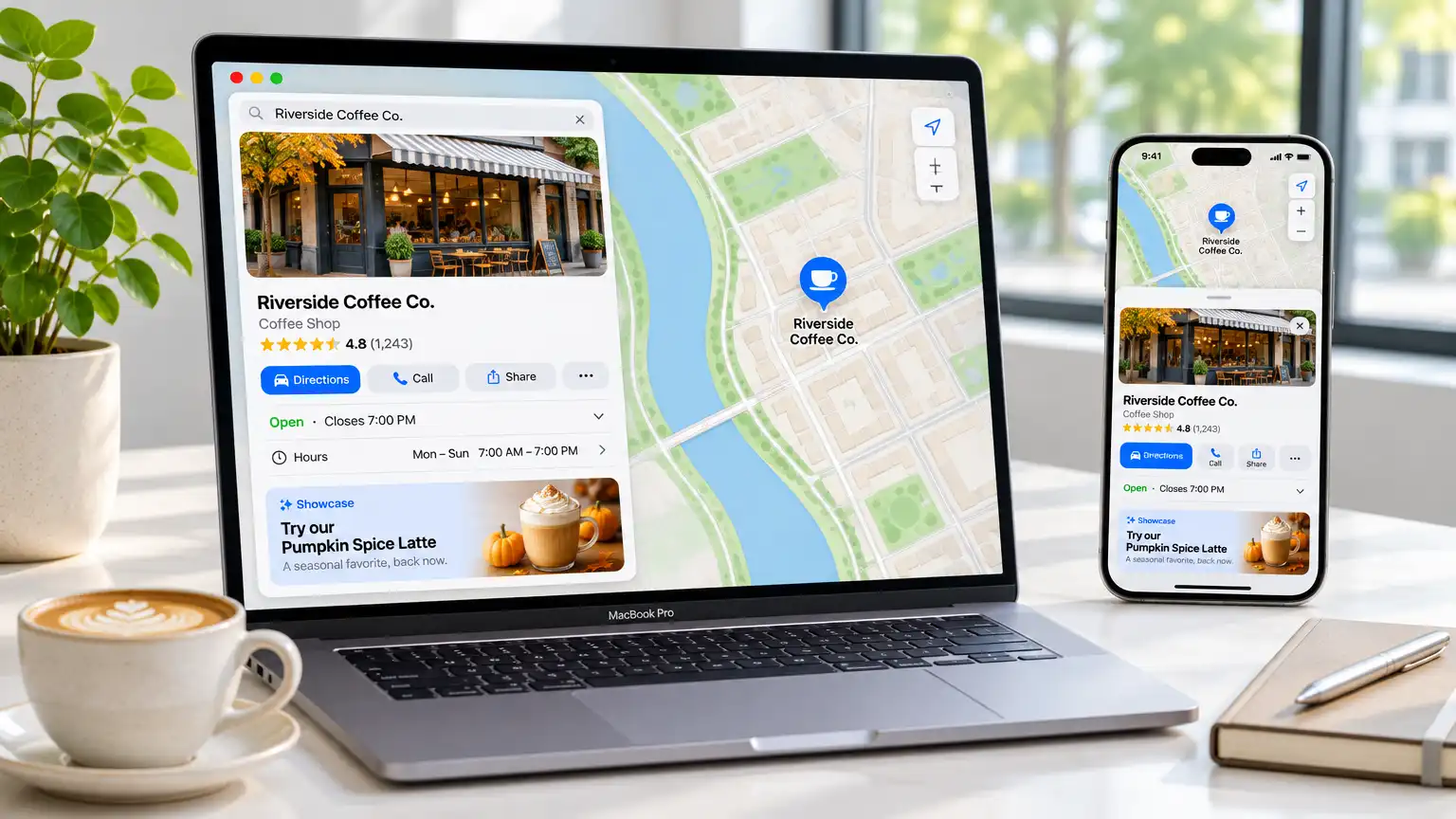
Ask a business owner where their customers find them, and they'll almost always say Google. That's usually true — but it's no longer the whole picture.
If you've ever asked an iPhone user for directions and watched them open Apple Maps instead of Google, you already know. Somewhere around half of all mobile map searches in the United States happen inside Apple Maps. Many of your customers never type your name into a search bar at all. They open the Maps app, search "phone repair" or "IT service near me," and tap the first result that looks good.
That result is a place card. And for years, the only way to influence what that card said was to fill out a form and hope. That changed. Apple built a free tool for exactly this.
Let's walk through what it is, what you get, and how to actually use it.
The Problem With Being Invisible on Apple Maps
Before we get into the solution, let's be honest about the gap.
Most small businesses have invested heavily in Google Business Profile. That's correct — Google still drives a large share of local searches. But Google Maps and Apple Maps are separate systems with separate data. Your Google listing does not automatically populate Apple Maps.
The result is a common and frustrating situation: a business with beautiful photos, hours, services, and a great description on Google shows up on Apple Maps as a bare pin with the wrong hours and no photos at all. Or the listing simply doesn't exist and Apple suggests a different business with a similar name.
For a customer standing in a parking lot at 4:45 PM on a Friday trying to find a shop that's still open, that's a lost sale. And they never even know it happened — they just assume you were closed and they drove to the next result.
Apple Business Connect fixes this at zero cost.
What Apple Business Connect Is
Apple Business Connect is a free self-service portal where any business can claim their location place cards and control how they appear across Apple's ecosystem — which includes:
- Apple Maps — the map most iPhone users open by default
- Messages — the place card that appears when someone shares your location in a text
- Wallet — transaction history and loyalty cards
- Siri — spoken answers to "Where's the nearest computer repair shop?"
- Weather and Look Up in the iOS 17+ app
Apple's own framing was that they created this so Apple users get "the most accurate information for places to eat, shop, travel, and more." For a business owner, the practical version is simpler: it's a second, and arguably more valuable, local listing you can control for free.
What's Actually Free — and What's Not
This part matters, because there's a lot of confusion online.
Free, with no card required:
- Claiming and verifying your location(s)
- Uploading and updating photos and your logo
- Editing your business name, description, hours, phone number, and website
- Updating your categories (the "attributes" like "Repair Service" or "Computer Store")
- Creating and publishing Showcases — the offer and promotion cards on your place card
- Adding action links that let customers order, book, or reserve directly from the card
- A fully self-service interface you can use yourself from any desktop or laptop
- The Business Connect API for multi-location brands
Paid (through Apple Ads):
- Sponsored placements and ads in Apple Maps
So the listing, the photos, the hours, the promotions — the whole foundational presence — costs nothing. Only advertising costs money, and even then you control the budget down to whatever you're comfortable spending.
What a Place Card Actually Shows
This is the part most people never look at, and understanding it tells you what to work on. A place card can contain:
- Your logo and cover photo — this is what people see first
- Your business name and category
- Star rating and review count
- Your hours, including special hours for holidays
- Your phone number and website
- Your services list
- Showcases — up to three promotional cards at a time
- Action buttons — "Order," "Book," "Make Reservation," "Order Groceries" and similar
That "up to three Showcases" detail is worth dwelling on. You can run three different promotions simultaneously and swap them out seasonally. A "Free Diagnostic — No Appointment Needed" showcase in February, a "Same-Day Screen Repair" in summer, a "Back-to-School Laptop Tune-Up" in August. Apple Maps customers tapping "Offers" on your card will see whatever you chose to feature that week.
How to Claim Your Business Connect Listing
The setup is straightforward, and you can do it yourself. Here's the step-by-step:
Step 1: Register
Go to businessconnect.apple.com and sign in with your existing Apple ID, or create one if you don't have it. You'll need access from a desktop or laptop computer — the portal is not built for phones.
Step 2: Find and verify your location
Enter your business name and address. Apple matches you against existing map data and asks you to confirm you're the legitimate owner. Verification methods include:
- A phone call to the business number listed on the listing
- A text message with a verification code
- Email confirmation
- Document upload (for entities with a registered business name, like an LLC or corporation)
Have your business license or formation documents handy if you operate under a legal entity name. Apple may ask for proof of the business operating at that address.
Step 3: Claim it and complete the card
Once verified, you can edit everything. Fill in every field completely — don't leave anything blank, because a blank field is a hole a competitor can fill better.
Step 4: Publish your Showcase
Go to Showcases, create one, choose a template, add your photo and offer text, and publish. If you already have a Google Business Profile, you can import your existing promotions rather than rewriting them.
Step 5: Set up action links
If you use a booking platform, a scheduling tool, or an ordering service that Apple supports, you can attach it directly. Someone taps your card and books without leaving Maps.
Step 6: Keep it current
This is the step most businesses skip, and it's the one that matters most. Apple expects the listing to be maintained. A place card with stale hours or last year's photo tells a customer your business isn't active — and they move on.
Why This Matters More Than You'd Think
The audience skews toward exactly who you want
Apple's advertising materials note that Gen Z and Millennials make up 57% of Maps users — and that data is consistent with broader industry reporting on where mobile map usage concentrates. That is precisely the demographic that searches "PC repair near me" or "virus removal service" at 9 PM on a Tuesday because their computer just died.
The search intent is already there
The most valuable thing about Maps traffic is that nobody types a URL or clicks a sponsored result. They ask for a category, a location, or a problem, and the app hands them three options. That's it. Your listing is in a small set of visible cards, not buried under ten sponsored blue links.
Action rates are high
Apple reports that roughly one in two searches for a business result in the user taking action — calling, navigating, or sharing. People using Maps are already leaning toward going somewhere.
It's genuinely zero cost
Google Business Profile is free too, and I recommend it to every client. But Apple Business Connect offers the same core functionality with zero ongoing cost and zero competition to set up, because most business owners have never heard of it.
Your Full Local Listing Stack
Here's the practical takeaway: Google should be one part of your local SEO, not the whole thing.
| Platform | What it does | Cost | Priority |
|---|---|---|---|
| Google Business Profile | Google Search, Google Maps, local pack | Free | Essential |
| Apple Business Connect | Apple Maps, Siri, Messages, Wallet | Free | High — most neglected |
| Bing Places | Bing, Copilot, some voice assistants | Free | Medium |
| Facebook / Instagram | Social proof, reviews, DMs | Free | Medium |
| Yelp | Reviews, strong in hospitality and food | Free tier | Niche |
| Apple Ads | Sponsored placement in Maps | Paid | Optional, test later |
| Paid Google Ads | Search and Maps ads | Paid | Optional |
The mistake is treating Google as the endpoint. The opportunity is treating each of these as a channel that costs nothing to fill in properly and compounds quietly in the background.
And notice that Business Connect, Bing Places, and Facebook are all free and all take roughly the same amount of time to fill out correctly. The marginal cost of adding them to your existing workflow is close to zero.
A 30-Minute Checklist
If you want to act on this without a huge project, here's the sequence:
Today (30 minutes):
- [ ] Register at businessconnect.apple.com
- [ ] Find and claim your location
- [ ] Complete every field — name, hours, phone, website, category, services
- [ ] Upload a clean logo and at least 5 good photos of your work
This week:
- [ ] Publish your first Showcase with a real offer
- [ ] Add special hours for upcoming holidays
- [ ] Search your business name in Apple Maps as a customer would and confirm the card looks right
This month:
- [ ] Set up one action link if you use a booking or scheduling tool
- [ ] Write a short standard reply process for Apple reviews
- [ ] Check your Google Business Profile and make sure hours, photos, and services match exactly
That last point deserves emphasis: your hours and phone number should be identical across every platform. A mismatch is the fastest way to lose a customer, because they'll call the wrong number, get voicemail, and assume you're closed.
Apple Maps Ads — Is It Worth It?
Once your free listing is polished, you can consider paid ads in Apple Maps through Apple Ads. Here's the honest breakdown:
How it works:
- Your ad appears in Suggested Places before a customer searches — as they're browsing, not yet committed
- Your ad appears at the top of search results after they search something like "Sporting goods" or "computer repair near me"
- Customers can call, navigate, or share directly from the ad
- You set your own budget, can start and stop anytime, and Apple credits the first $150
Why it's worth testing for a local service business:
- Placements are shown only to people actively looking for what you sell
- It appears before they narrow down — you can shape what they search for
- Pricing is on a pay-per-tap model, so you're paying for interest, not impressions
- A smaller, targeted advertiser can compete here more easily than in crowded Google Ads auctions
Where to be cautious:
- The Maps audience skews toward Apple users — if most of your customers are on Android, Google Ads will reach more people
- The credit is a one-time incentive, not a reason to scale
- Free listing optimization almost always has better ROI than ads, so do that first
A sensible test: spend a small fixed monthly amount, run it for 6–8 weeks, and track calls and direction requests with a dedicated phone number or a trackable landing page. Apple provides conversion tracking, and your own call tracking is what actually proves ROI.
Common Mistakes to Avoid
Leaving the description generic. "We fix computers" tells nobody anything. Describe what you actually do, who you serve, and why someone should drive across town to you instead of the next result.
Uploading one logo and nothing else. Photos of actual work — a clean desk setup, a repaired laptop open and running, your storefront — outperform stock imagery every time.
Ignoring the Showcase feature. It's the most visible editable slot on the card, and most claimed listings leave it empty.
Claiming multiple locations you don't own. You can only verify locations you're authorized to represent.
Expecting instant results. Apple Maps data syncs to the Maps app and Siri on Apple's schedule, not yours. Give changes 48 hours and check before assuming something failed.
Forgetting Reviews. Apple Maps reviews exist independently of Google reviews. Ask satisfied customers, politely, to leave a review on Apple Maps specifically. Say which platform — most people only review the first one they're asked about.
Using a personal Apple ID without an organization set up. For multi-location businesses, set up an Organization so your team can manage locations without sharing one person's credentials.
Common Questions
Is Apple Business Connect really free? Yes. Claiming your listing, editing your information, uploading photos, and publishing Showcases are all free with no subscription and no credit card. Only ads in Apple Maps cost money, and those are optional.
Do I need a Mac to use it? No — any desktop or laptop with a modern browser works. Apple doesn't require a Mac.
Does my Google Business Profile information transfer over? Partially. You can import existing promotions to Showcases. For core details like hours and photos, you'll add them directly.
What if there's already a listing for my business on Apple Maps? That's normal. Apple creates listings automatically from existing map data. You claim the correct one, verify ownership, and edit it. If there's a duplicate or an obviously wrong listing, you can request a correction after verification.
Does Apple Business Connect improve my Google ranking? Not directly — they're separate systems. But keeping both accurate and complete strengthens your overall local presence, and a consistent NAP (name, address, phone) across platforms is a ranking signal in its own right.
Can I manage multiple locations? Yes, and there's a Business Connect API for businesses with many locations, along with agency partners like Rio SEO, SOCi, Uberall, and Yext that handle listing management at scale.
Is there a support team? Yes — Business Connect support, plus a User Guide. For larger multi-location brands, agency partners can manage the work for you.
Final Thoughts
Here's the uncomfortable truth about local SEO in 2026: most of your competitors have a Google Business Profile and nothing else. That's the entire playbook — one listing, half-finished, with photos from 2022.
Apple Business Connect is a free, official Apple tool that puts you directly in front of the iPhone users already searching for your services, in the app they open without thinking about it. It takes under an hour to set up properly. The only reason more businesses don't do it is that nobody told them it existed.
If you build your Google listing well, Apple Business Connect is the cheapest incremental win available to a local business right now.
Want help getting set up? If you own a business in Frisco or anywhere in North Dallas and want someone to handle this end to end — claim your Apple Business Connect listing, complete the place card, publish your first Showcase, and align it with your Google Business Profile — get in touch. I'll also review your website for the mobile experience, since a lot of Map visitors tap through on a phone and leave within seconds if the page doesn't load fast or the phone number isn't easy to find.
You can reach me at (469) 388-3927 or sam@friscotechfix.com. Setup is included with my standard local SEO work, and I'll explain every step in plain English as we go.